摘要:
上一节对点云做了聚类处理,在这一节中要开始根据各个聚类区域来生成相应的平面多边形。
<CGAL/Polygonal_surface_reconstruction.h>
这两个引用文件,它的作者也正是NanLiangLiang老师,我只按我的喜好把它们摘出来做了下封装,打了些注释说明,且印象中只在这个框架下的候选平面那块做了些许改动,所以不要指望它相较源程序有多大优化。
构建假设(候选)平面的整体流程 好,先回main()函数中看一眼,这里创建了一个CGAL::Surface_mesh<Kernel::Point_3>类型的对象mesh_candidate,它是一个用于表示和处理三维表面网格的模板类。通过调用HypothesisPlaneProcess中的BuildHypothesisPlane(),可构建点云的候选(/假设)面片集合。
1
2
3
4
5
6
HypothesisPlaneProcess obj_hp; CGAL::Surface_mesh<Kernel::Point_3> mesh_candidate; obj_hp.BuildHypothesisPlane (cloud_seg, mesh_candidate); obj_file.SaveColorOBJ (path_output, obj_file.GetFileName (file_path) + "_mesh_candidate" , mesh_candidate);
围绕mesh_candidate,函数BuildHypothesisPlane()基于聚类点云cloud_seg进行面片的生成、处理,整个流程分为聚类点云的区域优化、构建包围盒面片、构建包围盒范围的候选平面、平面相交细分、候选面简化及面片属性计算这6个阶段。
1
2
3
4
5
6
7
8
9
10
11
12
13
14
15
16
17
18
19
20
21
22
23
24
25
26
27
28
29
30
31
32
33
34
35
36
37
38
39
40
41
42
43
44
45
46
47
48
49
50
51
52
53
54
55
56
57
58
59
60
61
62
63
64
65
66
67
68
69
70
71
72
73
74
75
76
77
78
79
80
81
82
83
84
void HypothesisPlaneProcess::BuildHypothesisPlane (const PointCloud & cloud_region, CGAL::Surface_mesh<Kernel::Point_3>& mesh_candidate) CGAL::Timer timer; timer.start (); std::vector<PNI> point_pni; for (int i = 0 ; i < cloud_region.size (); ++i) { PNI temp; temp.get <0 >() = cloud_region.point (i); temp.get <1 >() = cloud_region.normal (i); temp.get <2 >() = cloud_region.property_map <int >("region_map" ).first[i]; point_pni.push_back (temp); } CGAL::internal::Point_set_with_planes<Kernel> cloud_plane (point_pni, CGAL::Nth_of_tuple_property_map<0 , PNI>(), CGAL::Nth_of_tuple_property_map<1 , PNI>(), CGAL::Nth_of_tuple_property_map<2 , PNI>()) if (cloud_plane.planar_segments ().size () < 4 ) { std::cout << "错误:重建闭合表面模型至少需要4个平面聚类,该点云只有 " + std::to_string (cloud_plane.planar_segments ().size ()) + " 个聚类" << std::endl; return ; } _cloud_plane = &cloud_plane; PlaneRefine (); CGAL::Surface_mesh<Kernel::Point_3> mesh_bbox; BuildMeshBbox (mesh_bbox); BuildMeshCandidate (mesh_bbox, mesh_candidate); SegMeshCandidate (mesh_candidate); SimpleMeshCandidate_V2 (mesh_candidate); AddMeshProperty (mesh_candidate); CGAL::internal::Candidate_confidences<Kernel> conf; conf.compute (cloud_plane, mesh_candidate); timer.stop (); std::cout << "有 " << mesh_candidate.faces ().size () << " 个候选表面已生成,运行耗时 " << timer.time () << " 秒" << std::endl; }
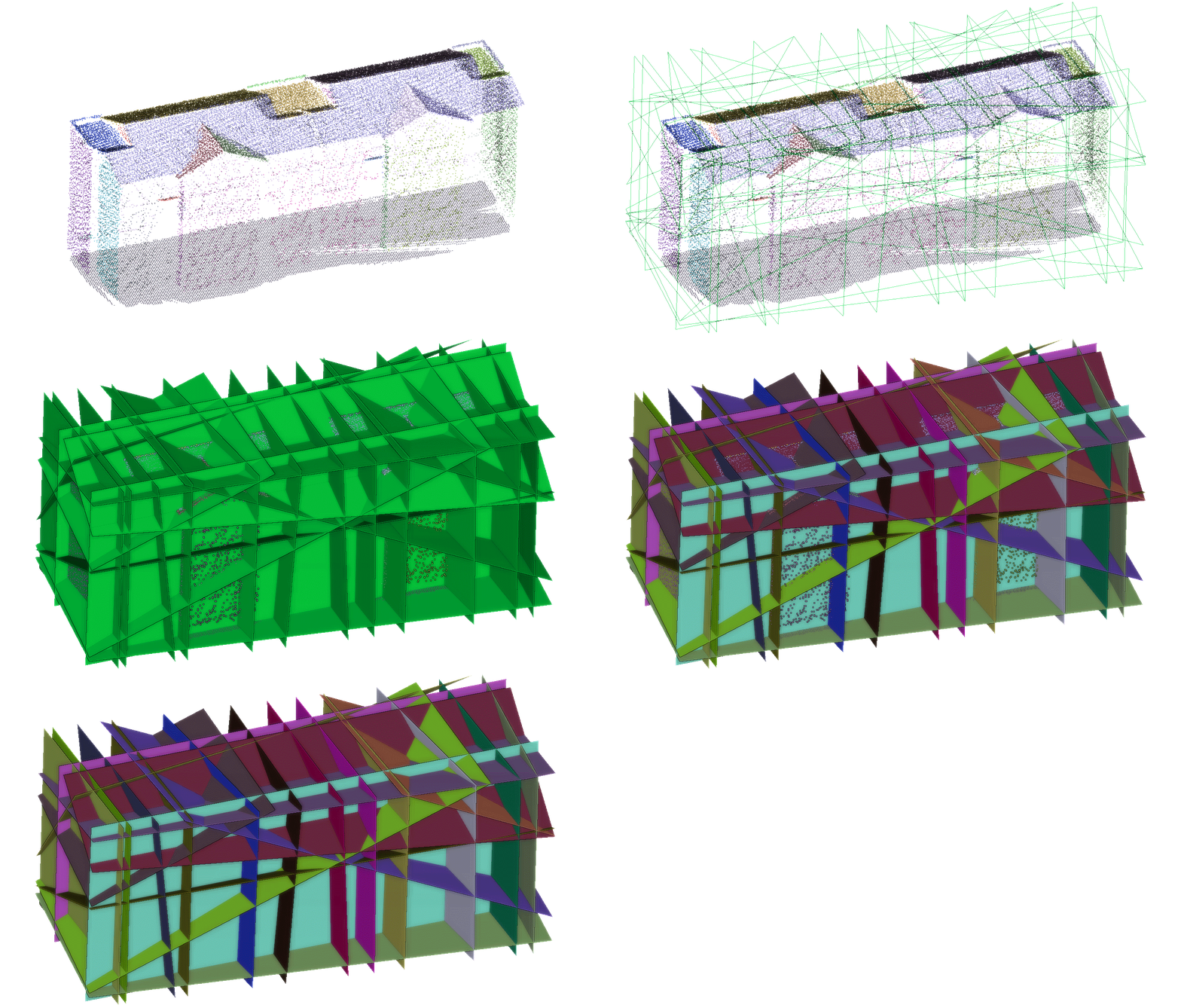
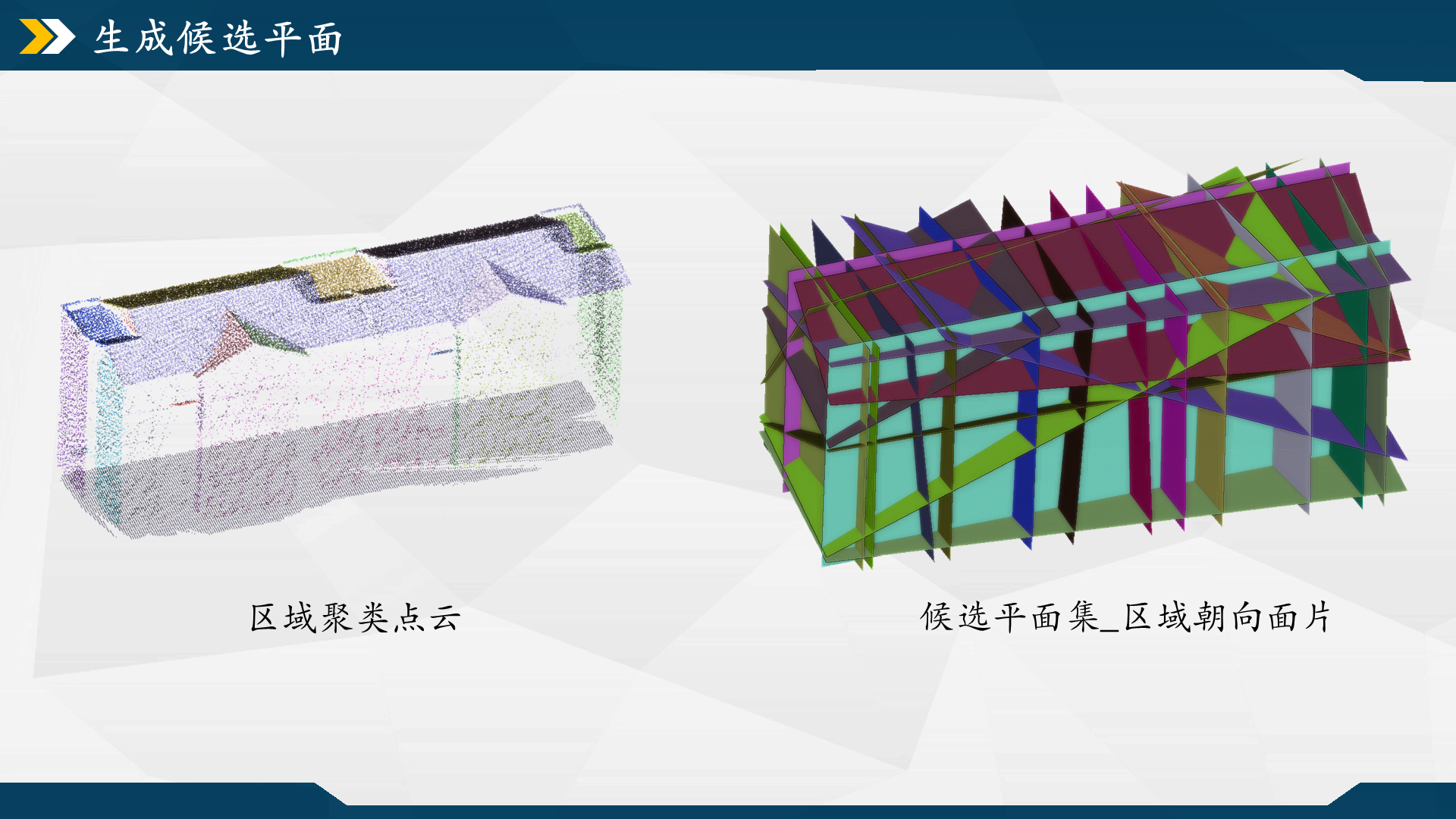
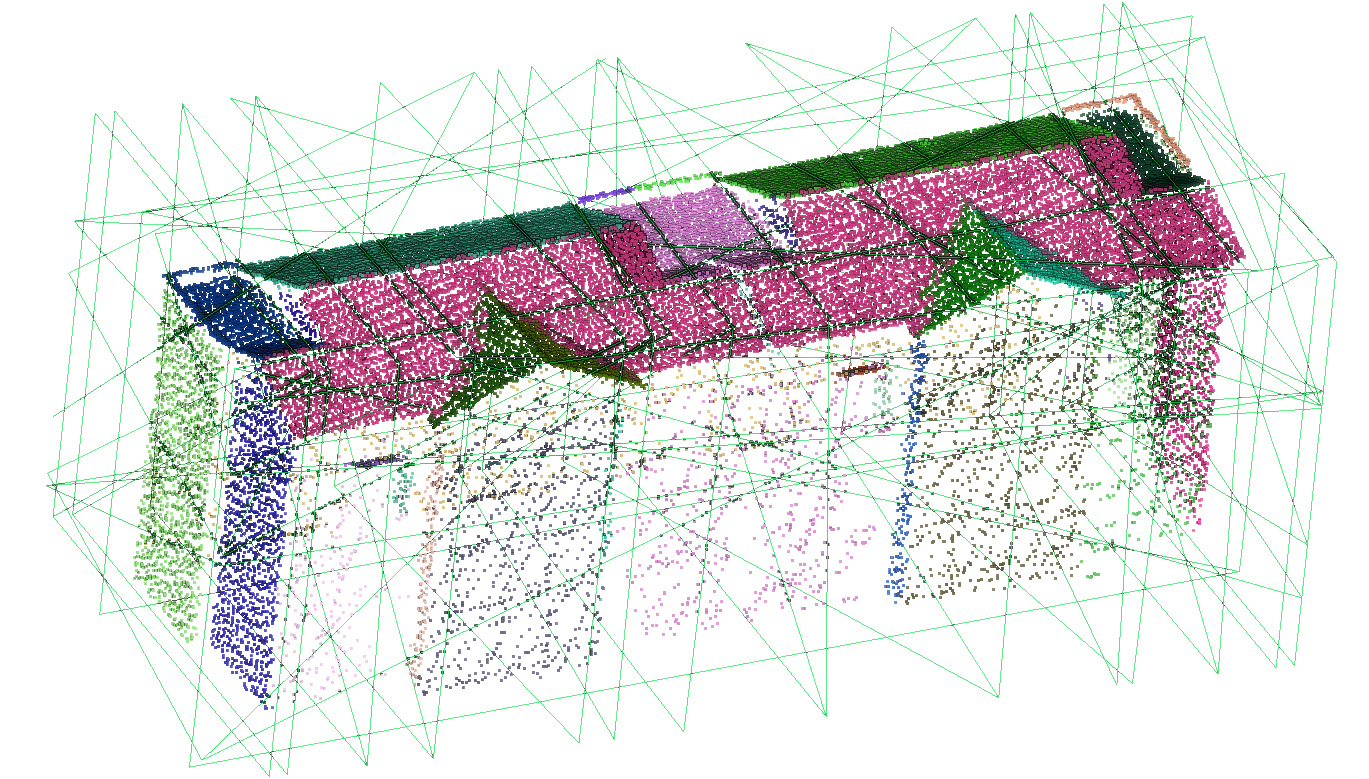
这里演示下基于聚类点云生成的平面基元结果。
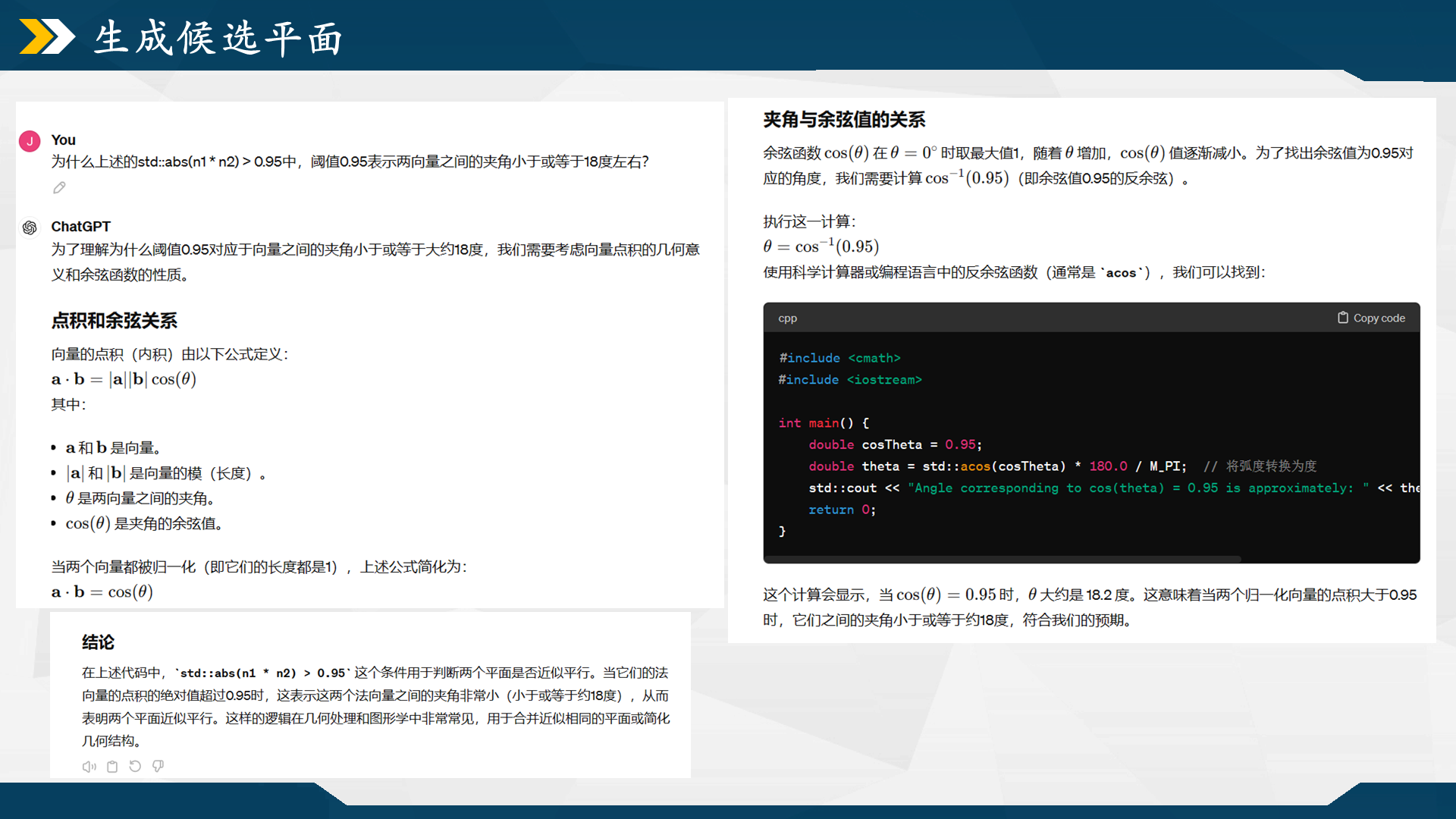
聚类点云的区域优化 这一个函数是想通过合并相近、法向近似的聚类来减少区域数量,从而降低计算负担。如何判断两个聚类需要合并?函数内设置了两个参数来简化聚类区域数量:点到区域最大距离的平均值avg_max_dist和区域间的法向量夹角_theta。整个流程主要分以下3步:
(2)获取拟合平面的法向量,判断法向量间的夹角是否小于_theta,满足判定的两个聚类朝向近似,可进一步做合并判断。_theta的设置无严格的理论依据,我按经验调整,夹角阈值调的越大则聚类越容易被合并,导致候选面集的面数越少,也就是细节越少。
(3)统计平面s1上是否有足够多的点离s2比较近。平面上的一个点距离另一个平面是否比较近,通过函数calNumber_points_on_plane()进行判断。是否“足够多”则通过num_threshold来判断,该值为s1平面上的点数除以5得到,似乎也是个经验调参值,我未做改动。代码中s1->s2和s2->s1都做了一遍统计,只要有任一个的统计数量能满足num_threshold,则合并两个聚类。
主流程 1 2 3 4 5 6 7 8 9 10 11 12 13 14 15 16 17 18 19 20 21 22 23 24 25 26 27 28 29 30 31 32 33 34 35 36 37 38 39 40 41 42 43 44 45 46 47 48 49 50 51 52 53 54 55 56 57 58 59 60 61 62 63 64 65 66 67 68 69 70 71 72 73 74 75 76 77 78 79 80 81 82 void HypothesisPlaneProcess::PlaneRefine () std::vector< CGAL::internal::Planar_segment<Kernel>* >& segments = _cloud_plane->planar_segments (); FT avg_max_dist = 0 ; for (std::size_t i = 0 ; i < segments.size (); ++i) { CGAL::internal::Planar_segment<Kernel>* s = segments[i]; const Kernel::Plane_3* plane = s->fit_supporting_plane (); FT max_dist = -(std::numeric_limits<FT>::max)(); for (std::size_t j = 0 ; j < s->size (); ++j) { std::size_t idx = s->at (j); const Kernel::Point_3& p = _cloud_plane->point_map ()[idx]; FT sdist = CGAL::squared_distance (*plane, p); max_dist = (std::max)(max_dist, std::sqrt (sdist)); } avg_max_dist += max_dist; } avg_max_dist /= segments.size (); avg_max_dist /= FT (2.0 ); bool merged = false ; do { merged = false ; std::sort (segments.begin (), segments.end (), CGAL::internal::SegmentSizeIncreasing<CGAL::internal::Planar_segment<Kernel>>()); for (std::size_t i = 0 ; i < segments.size (); ++i) { CGAL::internal::Planar_segment<Kernel>* s1 = segments[i]; const Kernel::Plane_3* plane1 = s1->supporting_plane (); Kernel::Vector_3 n1 = plane1->orthogonal_vector (); CGAL::internal::normalize <FT, Kernel::Vector_3>(n1); FT num_threshold = s1->size () / FT (5.0 ); for (std::size_t j = i + 1 ; j < segments.size (); ++j) { CGAL::internal::Planar_segment<Kernel>* s2 = segments[j]; const Kernel::Plane_3* plane2 = s2->supporting_plane (); Kernel::Vector_3 n2 = plane2->orthogonal_vector (); CGAL::internal::normalize <FT, Kernel::Vector_3>(n2); if (std::abs (n1 * n2) > std::cos (_theta)) { std::size_t set1on2 = calNumber_points_on_plane (s1, plane2, avg_max_dist); std::size_t set2on1 = calNumber_points_on_plane (s2, plane1, avg_max_dist); if (set1on2 > num_threshold || set2on1 > num_threshold) { plane_merge (s1, s2); merged = true ; break ; } } } if (merged) break ; } } while (merged); std::sort (segments.begin (), segments.end (), CGAL::internal::SegmentSizeDecreasing<CGAL::internal::Planar_segment<Kernel>>()); for (std::size_t i = 0 ; i < segments.size (); ++i) { CGAL::internal::Planar_segment<Kernel>* s = segments[i]; const Kernel::Plane_3* plane = s->supporting_plane (); _supporting_planes.push_back (plane); } }
实现细节_统计共面的点数 函数calNumber_points_on_plane(),计算平面s1上所有点到s2的距离,统计其中值小于avg_max_dist的点数。这些点视为平面s1离平面s2的近点,当这些点数超过一个阈值后,视两个聚类为同一个聚类。
1 2 3 4 5 6 7 8 9 10 11 12 13 14 15 16 17 18 19 20 21 22 23 24 std::size_t HypothesisPlaneProcess::calNumber_points_on_plane (const CGAL::internal::Planar_segment<Kernel>* s, const Kernel::Plane_3 * plane, FT dist_threshold) CGAL_assertion (const_cast <CGAL::internal::Planar_segment<Kernel>*>(s)->point_set () == _cloud_plane); const CGAL::internal::Point_set_with_planes<Kernel>::Point_map& points = _cloud_plane->point_map (); std::size_t count = 0 ; for (std::size_t i = 0 ; i < s->size (); ++i) { std::size_t idx = s->at (i); const Kernel::Point_3& p = points[idx]; FT sdist = CGAL::squared_distance (*plane, p); FT dist = std::sqrt (sdist); if (dist < dist_threshold) ++count; } return count; }
实现细节_聚类合并 聚类合并函数plane_merge(),源代码写得很规范,提取、合并两个聚类的点索引,并对新的聚类做一次最小二乘拟合,得到其平面系数。
1
2
3
4
5
6
7
8
9
10
11
12
13
14
15
16
17
18
19
20
21
22
23
24
25
26
27
28
29
30
31
32
33
34
35
36
37
38
39
40
41
42
43
44
45
46
void HypothesisPlaneProcess::plane_merge (CGAL::internal::Planar_segment<Kernel>* s1, CGAL::internal::Planar_segment<Kernel>* s2) CGAL_assertion (const_cast <CGAL::internal::Planar_segment<Kernel>*>(s1)->point_set () == _cloud_plane); CGAL_assertion (const_cast <CGAL::internal::Planar_segment<Kernel>*>(s2)->point_set () == _cloud_plane); std::vector< CGAL::internal::Planar_segment<Kernel>* >& segments = _cloud_plane->planar_segments (); std::vector<std::size_t > points_indices; points_indices.insert (points_indices.end (), s1->begin (), s1->end ()); points_indices.insert (points_indices.end (), s2->begin (), s2->end ()); CGAL::internal::Planar_segment<Kernel>* s = new CGAL::internal::Planar_segment <Kernel>(_cloud_plane); s->insert (s->end (), points_indices.begin (), points_indices.end ()); s->fit_supporting_plane (); segments.push_back (s); typename std::vector< CGAL::internal::Planar_segment<Kernel>* >::iterator pos = std::find (segments.begin (), segments.end (), s1); if (pos != segments.end ()) { CGAL::internal::Planar_segment<Kernel>* tmp = *pos; const Kernel::Plane_3* plane = tmp->supporting_plane (); segments.erase (pos); delete tmp; delete plane; } else std::cerr << "Fatal error: should not reach here" << std::endl; pos = std::find (segments.begin (), segments.end (), s2); if (pos != segments.end ()) { CGAL::internal::Planar_segment<Kernel>* tmp = *pos; const Kernel::Plane_3* plane = tmp->supporting_plane (); segments.erase (pos); delete tmp; delete plane; } else std::cerr << "Fatal error: should not reach here" << std::endl; }
思路复述 再复述一次合并的具体实现:先是对点云中的各个区域按点数量由小到大排序,再套两层遍历,从中取两个区域s1和s2,分别拟合平面并计算平面归一化后的法向量,再然后,按照向量间的夹角公式,当这两个法向量内积的绝对值大于角度阈值的余弦值时,表示两个区域近似平行。这里的std::abs表示取绝对值,在第一、二象限中余弦值越大表示向量间的夹角越小。
这一节对聚类点云做了个合并优化,点云点数是没变的,但点簇数/区域数量减少了,相应的拟合平面数量也就减少了,能稍稍缓解后续的运算压力。
构造包围盒 经上一节处理,理论上聚类点云的“分类数量”能有一定程度的减少。当然,到目前为止我们的处理对象仍为点云。到了本小节,开始以此为基础构建面元结构。
如前文所述,聚类点云按最小二乘/PCA等方法按平面方程做拟合,得到的是平面系数,它可视化呈现出来的是一大整块无边界的平面。为了避免后续产生冗余数据,需构建平面的多边形边界。
1 2 3 4 5 6 7 8 9 10 11 12 13 14 15 16 17 18 19 20 21 22 23 24 25 26 27 28 29 30 31 32 33 34 35 const Kernel::Iso_cuboid_3& box = CGAL::bounding_box (_cloud_plane->point_map ().begin (), _cloud_plane->point_map ().end ());FT dx = box.xmax () - box.xmin (); FT dy = box.ymax () - box.ymin (); FT dz = box.zmax () - box.zmin (); FT radius = FT (0.5 ) * std::sqrt (dx * dx + dy * dy + dz * dz); FT offset = radius * FT (0.05 ); FT xmin = box.xmin () - offset, xmax = box.xmax () + offset; FT ymin = box.ymin () - offset, ymax = box.ymax () + offset; FT zmin = box.zmin () - offset, zmax = box.zmax () + offset; mesh.clear (); Polygon_mesh::Vertex_index v0 = mesh.add_vertex (Kernel::Point_3 (xmin, ymin, zmin)); Polygon_mesh::Vertex_index v1 = mesh.add_vertex (Kernel::Point_3 (xmax, ymin, zmin)); Polygon_mesh::Vertex_index v2 = mesh.add_vertex (Kernel::Point_3 (xmax, ymin, zmax)); Polygon_mesh::Vertex_index v3 = mesh.add_vertex (Kernel::Point_3 (xmin, ymin, zmax)); Polygon_mesh::Vertex_index v4 = mesh.add_vertex (Kernel::Point_3 (xmax, ymax, zmax)); Polygon_mesh::Vertex_index v5 = mesh.add_vertex (Kernel::Point_3 (xmax, ymax, zmin)); Polygon_mesh::Vertex_index v6 = mesh.add_vertex (Kernel::Point_3 (xmin, ymax, zmin)); Polygon_mesh::Vertex_index v7 = mesh.add_vertex (Kernel::Point_3 (xmin, ymax, zmax)); mesh.add_face (v0, v1, v2, v3); mesh.add_face (v1, v5, v4, v2); mesh.add_face (v1, v0, v6, v5); mesh.add_face (v4, v5, v6, v7); mesh.add_face (v0, v3, v7, v6); mesh.add_face (v2, v4, v7, v3);
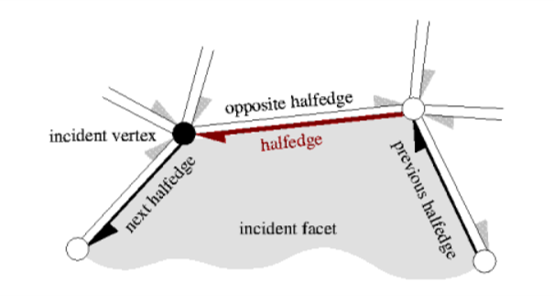
有个要注意的点是,Surface_mesh<Kernel::Point_3>的add_face()函数,点的添加顺序不宜乱动,因为这里面每个面的顶点都是按顺时针/逆时针排列的。乱改可能会因为合法性的问题无法正常生成面片,大概是因为里面的半边结构HalfEdge对面的合理性做了约束。[17] ,我当时的理解是,多边形网络是由很多条边构成的嘛,但这些边可能也就只存储了两个点的索引,为了能增加边与边、边与面之间的拓扑关系,CGAL设计了半边结构这种类型,它在边的基础上设置了两条有向线段,两条有向线段的指向方向互相相反,分别以边的两个点为起点/终点,它们对应两个半边结构,称为对偶半边。
后面还有一部分代码,是对mesh_box这个对象附加属性,分别构建以面、边、点的索引为key值,平面对象为键值的属性,相当于将面、边、点与另外构建的平面做唯一绑定,这个另外构建的平面我称其为支撑平面,由于其相较mesh中的面片结构是没有边界的,能为后续的一些几何运算提供检索便利。
1 2 3 4 5 6 7 8 9 10 11 12 13 14 15 16 17 18 19 20 21 22 23 24 25 26 27 28 29 30 31 32 33 34 35 36 37 38 39 40 41 42 43 44 45 46 47 48 49 50 51 52 53 54 55 56 57 58 59 60 61 62 63 64 65 typename Polygon_mesh::template Property_map<Polygon_mesh::Face_index, const Kernel::Plane_3*> face_supporting_planes = mesh.template add_property_map <Polygon_mesh::Face_index, const Kernel::Plane_3*>("f:supp_plane" ).first; typename Polygon_mesh::template Property_map<Polygon_mesh::Edge_index, std::set<const Kernel::Plane_3*> > edge_supporting_planes = mesh.template add_property_map<Polygon_mesh::Edge_index, std::set<const Kernel::Plane_3*> >("e:supp_plane" ).first; typename Polygon_mesh::template Property_map<Polygon_mesh::Vertex_index, std::set<const Kernel::Plane_3*> > vertex_supporting_planes = mesh.template add_property_map<Polygon_mesh::Vertex_index, std::set<const Kernel::Plane_3*> >("v:supp_plane" ).first; for (auto fd : mesh.faces ()){ Polygon_mesh::Halfedge_index h = mesh.halfedge (fd); Polygon_mesh::Vertex_index va = mesh.target (h); const Kernel::Point_3& pa = mesh.points ()[va]; h = mesh.next (h); Polygon_mesh::Vertex_index vb = mesh.target (h); const Kernel::Point_3& pb = mesh.points ()[vb]; h = mesh.next (h); Polygon_mesh::Vertex_index vc = mesh.target (h); const Kernel::Point_3& pc = mesh.points ()[vc]; const Kernel::Plane_3* plane = new Kernel::Plane_3 (pa, pb, pc); _supporting_planes.push_back (plane); face_supporting_planes[fd] = plane; } for (auto ed : mesh.edges ()){ Polygon_mesh::Halfedge_index h1 = mesh.halfedge (ed); Polygon_mesh::Halfedge_index h2 = mesh.opposite (h1); Polygon_mesh::Face_index f1 = mesh.face (h1); Polygon_mesh::Face_index f2 = mesh.face (h2); CGAL_assertion (f1 != Polygon_mesh::null_face ()); CGAL_assertion (f2 != Polygon_mesh::null_face ()); const Kernel::Plane_3* plane1 = face_supporting_planes[f1]; const Kernel::Plane_3* plane2 = face_supporting_planes[f2]; CGAL_assertion (plane1 && plane2 && plane1 != plane2); edge_supporting_planes[ed].insert (plane1); edge_supporting_planes[ed].insert (plane2); CGAL_assertion (edge_supporting_planes[ed].size () == 2 ); } for (auto vd : mesh.vertices ()){ CGAL_assertion (vertex_supporting_planes[vd].size () == 0 ); CGAL::Halfedge_around_target_circulator<Polygon_mesh> hbegin (vd, mesh) , done (hbegin) ; do { Polygon_mesh::Halfedge_index h = *hbegin; Polygon_mesh::Face_index f = mesh.face (h); const Kernel::Plane_3* plane = face_supporting_planes[f]; vertex_supporting_planes[vd].insert (plane); ++hbegin; } while (hbegin != done); CGAL_assertion (vertex_supporting_planes[vd].size () == 3 ); } std::sort (_supporting_planes.begin (), _supporting_planes.end ()); CGAL_assertion (mesh.is_valid ());
构建候选表面多边形 有了包围盒多边形作为切割边界,开始基于聚类点云拟合出各个区域的平面。
属性声明 多边形构建的实现函数HypothesisPlaneProcess::BuildMeshCandidate(),迎面撞过来的是一大堆typename别名,他们都是多边形上各个对象与其对应的支撑平面或所属区域的属性。这里可以很明显的看到,候选平面的属性别名用的是add_property_map()方法,而包围盒的属性别名用的都是property_map()方法,这是因为在之前的构造中已创建过包围盒相应的属性,当然改用add_property_map()应该也没问题。
1 2 3 4 5 6 7 8 9 10 11 12 13 14 15 16 17 18 19 20 Polygon_mesh::Property_map<Polygon_mesh::Edge_index, std::set<const Kernel::Plane_3*> > bbox_edge_supporting_planes = bbox_mesh.property_map<Polygon_mesh::Edge_index, std::set<const Kernel::Plane_3*> >("e:supp_plane" ).first; Polygon_mesh::Property_map<Polygon_mesh::Vertex_index, std::set<const Kernel::Plane_3*> > bbox_vertex_supporting_planes = bbox_mesh.property_map<Polygon_mesh::Vertex_index, std::set<const Kernel::Plane_3*> >("v:supp_plane" ).first; mesh_candidate.clear (); Polygon_mesh::Property_map<Polygon_mesh::Face_index, const Kernel::Plane_3*> face_supporting_planes = mesh_candidate.add_property_map <Polygon_mesh::Face_index, const Kernel::Plane_3*>("f:supp_plane" ).first; Polygon_mesh::Property_map<Polygon_mesh::Face_index, CGAL::internal::Planar_segment<Kernel>*> face_supporting_segments = mesh_candidate.add_property_map<Polygon_mesh::Face_index, CGAL::internal::Planar_segment<Kernel>*>("f:supp_segment" ).first; Polygon_mesh::Property_map<Polygon_mesh::Edge_index, std::set<const Kernel::Plane_3*> > edge_supporting_planes = mesh_candidate.add_property_map<Polygon_mesh::Edge_index, std::set<const Kernel::Plane_3*> >("e:supp_plane" ).first; Polygon_mesh::Property_map<Polygon_mesh::Vertex_index, std::set<const Kernel::Plane_3*> > vertex_supporting_planes = mesh_candidate.add_property_map<Polygon_mesh::Vertex_index, std::set<const Kernel::Plane_3*> >("v:supp_plane" ).first;
这里我额外添加了一个新的属性f:region_map,用于确定面片所属的区域,给以后的面片简化用的,本质上与f:supp_segment近似。
1 2 3 Polygon_mesh::Property_map<Polygon_mesh::Face_index, std::size_t > face_region_map = mesh_candidate.add_property_map <Polygon_mesh::Face_index, std::size_t >("f:region_map" ).first;
计算相交点 接下来,遍历聚类点云的每个区域,将每个区域拟合为切面cutting_plane;
1 2 3 4 5 6 CGAL::internal::Planar_segment<Kernel>* g = _cloud_plane->planar_segments ()[i]; const Kernel::Plane_3* cutting_plane = _cloud_plane->planar_segments ()[i]->supporting_plane (); std::vector<Kernel::Point_3> intersecting_points; std::vector< std::set<const Kernel::Plane_3*> > intersecting_points_source_planes;
对这里的每个面,计算其与包围盒的各个交点,也就是确定其边界。具体实现中是遍历包围盒的边,取边的两个端点构成线段,判断该直线与cutting_plane是否存在交点。这里源码有点乱,它分别作了三次交点判断:面与线段st、面分别与s、t两个端点。
1 2 3 4 5 6 7 8 9 10 11 12 13 14 15 16 17 18 19 20 21 22 23 24 25 26 27 28 29 30 31 32 33 34 35 36 37 38 39 40 41 42 43 44 45 46 47 for (auto ed : bbox_mesh.edges ()){ Polygon_mesh::Vertex_index sd = bbox_mesh.vertex (ed, 0 ); Polygon_mesh::Vertex_index td = bbox_mesh.vertex (ed, 1 ); const Kernel::Point_3& s = bbox_mesh.points ()[sd]; const Kernel::Point_3& t = bbox_mesh.points ()[td]; CGAL::Oriented_side ss = cutting_plane->oriented_side (s); CGAL::Oriented_side st = cutting_plane->oriented_side (t); if ((ss == CGAL::ON_POSITIVE_SIDE && st == CGAL::ON_NEGATIVE_SIDE) || (ss == CGAL::ON_NEGATIVE_SIDE && st == CGAL::ON_POSITIVE_SIDE)) { CGAL::Object obj = CGAL::intersection (*cutting_plane, Kernel::Line_3 (s, t)); if (const Kernel::Point_3* p = CGAL::object_cast <Kernel::Point_3>(&obj)) { intersecting_points.push_back (*p); std::set<const Kernel::Plane_3*> planes = bbox_edge_supporting_planes[ed]; planes.insert (cutting_plane); CGAL_assertion (planes.size () == 3 ); intersecting_points_source_planes.push_back (planes); } else std::cerr << "错误:平面 plane_cutting 与线段 st 不存在交集" << std::endl; } else { if (ss == CGAL::ON_ORIENTED_BOUNDARY && st != CGAL::ON_ORIENTED_BOUNDARY) { intersecting_points.push_back (s); const std::set<const Kernel::Plane_3*>& planes = bbox_vertex_supporting_planes[sd]; CGAL_assertion (planes.size () == 3 ); intersecting_points_source_planes.push_back (planes); } else if (st == CGAL::ON_ORIENTED_BOUNDARY && ss != CGAL::ON_ORIENTED_BOUNDARY) { intersecting_points.push_back (t); const std::set<const Kernel::Plane_3*>& planes = bbox_vertex_supporting_planes[td]; CGAL_assertion (planes.size () == 3 ); intersecting_points_source_planes.push_back (planes); } } }
筛选凸包点 得到切面与点云包围盒的交点后,根据交点坐标构造凸包结构,也就是在切面cutting_plane上确定这些点的连接顺序,以他们为边界生成一块面片。
1 2 3 4 5 6 7 8 9 10 11 12 13 14 15 16 17 18 19 20 21 22 23 24 25 26 if (intersecting_points.size () >= 3 ){ std::list<Kernel::Point_3> pts; for (std::size_t i = 0 ; i < intersecting_points.size (); ++i) { const Kernel::Point_3& p = intersecting_points[i]; const Kernel::Point_2& q = cutting_plane->to_2d (p); pts.push_back (Kernel::Point_3 (q.x (), q.y (), FT (i))); } std::list<Kernel::Point_3> hull; CGAL::convex_hull_2 (pts.begin (), pts.end (), std::back_inserter (hull), CGAL::Projection_traits_xy_3 <Kernel>()); std::vector<Kernel::Point_3> point_convexHull; std::vector< std::set<const Kernel::Plane_3*> > ch_source_planes; for (typename std::list<Kernel::Point_3>::iterator it = hull.begin (); it != hull.end (); ++it) { std::size_t idx = std::size_t (it->z ()); point_convexHull.push_back (intersecting_points[idx]); ch_source_planes.push_back (intersecting_points_source_planes[idx]); } }
构造(含边界的)新面 确定出切面边界(凸包)的点坐标后,按顺序连接来构建面片。转存这些点的下标到descriptors后,使用add_face()函数在候选平面集对象mesh_candidate内构造新的面。add_face()的调用示例可参考[18] ,它属于CGAL中的Euler运算[19] ,能在维护原有半边结构的情况下创建多边形网络的新边、面。(注:建议瞅一瞅,里面有些概念图能加深对半边、环、面的理解)
1 2 3 4 5 6 7 8 9 10 11 12 13 14 15 16 17 18 19 20 21 22 23 24 25 26 27 28 29 30 31 32 33 34 35 36 37 38 39 40 41 if (point_convexHull.size () >= 3 ){ std::vector<Polygon_mesh::Vertex_index> descriptors; for (std::size_t j = 0 ; j < point_convexHull.size (); ++j) { Polygon_mesh::Vertex_index vd = mesh_candidate.add_vertex (point_convexHull[j]); descriptors.push_back (vd); vertex_supporting_planes[vd] = ch_source_planes[j]; CGAL_assertion (vertex_supporting_planes[vd].size () == 3 ); } Polygon_mesh::Face_index fd = mesh_candidate.add_face (descriptors); face_supporting_segments[fd] = _cloud_plane->planar_segments ()[i]; face_supporting_planes[fd] = cutting_plane; face_region_map[fd] = i; CGAL::Halfedge_around_face_circulator<Polygon_mesh> hbegin (mesh_candidate.halfedge(fd), mesh_candidate) , done (hbegin) ; do { Polygon_mesh::Halfedge_index hd = *hbegin; Polygon_mesh::Edge_index ed = mesh_candidate.edge (hd); Polygon_mesh::Vertex_index s_vd = mesh_candidate.source (hd); Polygon_mesh::Vertex_index t_vd = mesh_candidate.target (hd); const std::set<const Kernel::Plane_3*>& s_planes = vertex_supporting_planes[s_vd]; const std::set<const Kernel::Plane_3*>& t_planes = vertex_supporting_planes[t_vd]; std::set<const Kernel::Plane_3*> common_planes; std::set_intersection (s_planes.begin (), s_planes.end (), t_planes.begin (), t_planes.end (), std::inserter (common_planes, common_planes.begin ())); if (common_planes.size () == 2 ) { CGAL_assertion (edge_supporting_planes[ed].size () == 0 ); edge_supporting_planes[ed] = common_planes; CGAL_assertion (edge_supporting_planes[ed].size () == 2 ); } else std::cerr << "topological error 拓扑错误" << std::endl; ++hbegin; } while (hbegin != done); }
小结 循环每个点云区域并按上述方法构建面片,mesh_candidate内就有若干个跨幅大小为包围盒范围的大块面片。把实际建筑的各个特征区域在脑海里拉长延伸为平面,那此时mesh_candidate中的面片即为这种情况的可视化。
参考文献&引用 [1] https://3d.bk.tudelft.nl/liangliang/ [2] https://3d.bk.tudelft.nl/liangliang/publications/2017/polyfit/polyfit.html [3] https://www.youtube.com/watch?v=_0brfDFkIkc [4] Linfu X ,Han H ,Qing Z , et al. Combined Rule-Based and Hypothesis-Based Method for Building Model Reconstruction from Photogrammetric Point Clouds [J]. Remote Sensing, 2021, 13 (6): 1107-1107. [5] Nan L , Wonka P .PolyFit: Polygonal Surface Reconstruction from Point Clouds[C]//International Conference on Computer Vision.IEEE, 2017. https://github.com/Kitware/CMake/releases/download/v3.29.3/cmake-3.29.3-windows-x86_64.zip https://boostorg.jfrog.io/artifactory/main/release/1.85.0/source/boost_1_85_0.7z https://github.com/CGAL/cgal/releases/download/v5.6.1/CGAL-5.6.1.zip https://gitlab.com/libeigen/eigen/-/archive/3.4.0/eigen-3.4.0.zip https://scipopt.org/download.php?fname=SCIPOptSuite-9.0.0-win64-VS15.exe https://zenodo.org/records/4390295#.Y0eIodJBxuV https://www.zhihu.com/question/277599635/answer/2149719454 https://zhuanlan.zhihu.com/p/668272208 https://doc.cgal.org/latest/Polygonal_surface_reconstruction/index.html#Chapter_PolygonalSurfaceReconstruction https://zhuanlan.zhihu.com/p/90858099 https://zhuanlan.zhihu.com/p/668272208 [17] https://doc.cgal.org/latest/HalfedgeDS/index.html https://segmentfault.com/q/1010000043819426 https://doc.cgal.org/latest/BGL/group__PkgBGLEulerOperations.html#gaa386d0cdef3b5d6ef43d6b503392dbcd